
Overview — DFT+ for Distribution Companies
Distribution companies operate across multiple operational systems — ERP, WMS, CRM, eCommerce, EDI, logistics, and supplier platforms. Each system captures transactions differently, creating inconsistencies that make reporting fragile and difficult to scale.
DFT+ (Dimension, Fact, Time) modeling separates operational system complexity from the analytics layer, providing distributors with stable, trusted data for reporting, planning, and AI-driven decisions.
Within DFT+, a SPOT (Single Point of Truth) defines the authoritative dataset for each core distribution concept — such as Customer, Item, Warehouse, Vendor, Sales Order, Inventory Position, and Revenue, Cost of Sales, GP, and Quantity metrics.
Each SPOT is implemented as a curated data-warehouse table, view, or calculation that uses SQL to deliver clean, clearly named fields — primary keys, foreign keys, and analysis attributes — ensuring dashboards, KPIs, and AI models remain stable even when source systems change.
Example — Customer SPOT
The Customer SPOT centralizes all attributes required for customer and channel analysis.
Data may originate from multiple sources:
-
ERP → Customer ID, credit terms, pricing class, billing information
-
CRM → industry, lead source, account owner
-
eCommerce → channel classification and digital behavior
-
EDI systems → trading partner identifiers
-
External datasets → territories, market segmentation, or enrichment data
The SPOT harmonizes and deduplicates customers across systems, enabling consistent analysis of:
-
customer profitability
-
channel performance
-
sales territory reporting
-
acquisition vs. retention trends
-
consolidated reporting after acquisitions or system migrations
Why DFT+ Matters for Distribution
Distribution businesses constantly evolve:
-
ERP upgrades or replacements
-
Warehouse expansions
-
Multi-company consolidations
-
New sales channels (eCommerce, marketplaces, EDI)
-
Supplier and logistics integrations
One of the primary goals of DFT+ is to keep reporting, analytics, and AI models stable through these changes.
Instead of rebuilding dashboards every time systems evolve, DFT+ preserves a consistent analytics foundation — allowing distributors to focus on improving operations, inventory turns, service levels, and margins rather than fixing reports.
Business Outcomes for Distributors
DFT+ enables reliable analysis across:
-
Inventory availability and turns
-
Fill rate and service performance
-
Gross margin by item, customer, or channel
-
Supplier performance and lead times
-
Order fulfillment efficiency
-
Demand trends and forecasting
By establishing SPOT datasets, distribution companies gain a durable analytics foundation that supports growth, system change, and data-driven decision making.
DFT+ Stages
Stage 1 — Source Mirroring: Creates a clean, fast, low-impact copy of raw source data, preserving lineage and keys.
Stage 2 — Data Warehouse: Builds the primary SPOTs (dimensions/facts) via SQL (or Python), applying cleansing and conformance, and defining clear columns plus surrogate/foreign keys..
Stage 3 — Analytics: Leverages analytics engines modeling (e.g., Domo, Looker, Power BI, Tableau), optimizing joins and aggregations where those tools perform best.
Stage 4 — Report, Dashboard, and KPI Templates: This is an extensive and customizable library of reports, dashboards, and KPIs that plug-and-play on Stage 3.
Stage 1 - Source Mirroring
DataSelf ETL+ is a powerful, easy-to-use tool for source mirroring.
You can design this Stage from scratch (click the following list of ETL+ 430+ No-code Data Sources), or accelerate optimized mirroring with our pre-mapped ETL+ Pre-mapped Source Systems.
Stage 2 - Data Warehouse
Stage 2 is housed in a SQL data warehouse (usually SQL tables/views). It transforms ERP-specific structures into the standardized model used by reports and dashboards (as in DataSelf Stages 3–4 templates).
Changing Stage 2 logic automatically propagates to all downstream reports and dashboards. For example, changing the Gross Profit calculation to absorb freight in Stage 2 will automatically show Gross Profit with freight absorbed in all downstream reports, dashboards, and AI models.
|
Table Name |
|
|---|---|
|
_D_Account |
CA, CO, CM, CT |
|
_D_Acct_Address |
CA, CO, CM, CT |
|
_D_Appointment |
FS |
|
_D_Branch |
All |
|
_D_Company |
All |
|
_D_CustAddress |
AR,CA,EO, ER,ES,ET,PM,SI,SO |
|
_D_Customer |
AR,CA,CF,IP,EO,ER,ES,ET,PM,SI,SO |
|
_D_CustomField |
TBD |
|
_D_eCommerce_Order |
EO |
|
_D_Employee |
PY |
|
_D_Equipment |
FS |
|
_D_GL_Acct |
AR, GF, GT, SI, SO |
|
_D_GL_SubAcct |
AR, GF, GT, SI, SO |
|
_D_Item |
EO, ER,ES,ET,IO, IH, IP, IT, PO, SI, SO |
|
_D_Lead |
CA, CM, CO, CT |
|
_D_Location |
IO, IH, IP, IT, PO, SI, SO |
|
_D_Marketing_Email |
CM |
|
_D_Opportunity |
CO |
|
_D_Project |
PM |
|
_D_Salesperson |
AR, CA, PM, SI, SO |
|
_D_ShipTo |
EO,ER,ES,IO, IH, IP, IT, PO, SI, SO |
|
_D_Technician |
FS |
|
_D_Territory |
CA,CO,CM,CT,EO,ER,ES |
|
_D_Ticket |
CT |
|
_D_Vendor |
AP, IT, PO |
|
_D_Warehouse |
IO, IH, IP, IT, PO, SI, SO |
|
_F_AP_Aging_Today |
AP |
|
_F_AR_Aging_Today |
AR |
|
_F_Cash_Flow_Projection |
CF |
|
_F_CRM_Contact_Activity |
CA |
|
_F_CRM_Marketing_Email |
CM |
|
_F_CRM_Opportunity |
CO |
|
_F_CRM_Ticket |
CT |
|
_F_eCommerce_Order |
EO |
|
_F_eCommerce_Returns |
ER |
|
_F_eCommerce_ShoppingCart |
ES |
|
_F_eCommerce_Traffic |
ET |
|
_F_GL_Financials |
GF |
|
_F_GL_Transaction |
GT |
|
_F_GoogleAnalytics |
GA |
|
_F_IN_Inventory_Planning |
IP |
|
_F_IN_On_Hand_Today |
IO |
|
_F_IN_On_Hand_History |
IH |
|
_F_IN_Transaction |
IT |
|
_F_Payroll |
PY |
|
_F_Project_Management |
PM |
|
_F_Purchase_Order |
PO |
|
_F_Sales_Invoice |
SI |
|
_F_Sales_Order |
SO |
|
_T_DataAsOf |
All |
|
_T_Date |
All |
|
_T_Period |
GF, GT, IH |
Stage 2 DFT+ - A SQL Statement Example
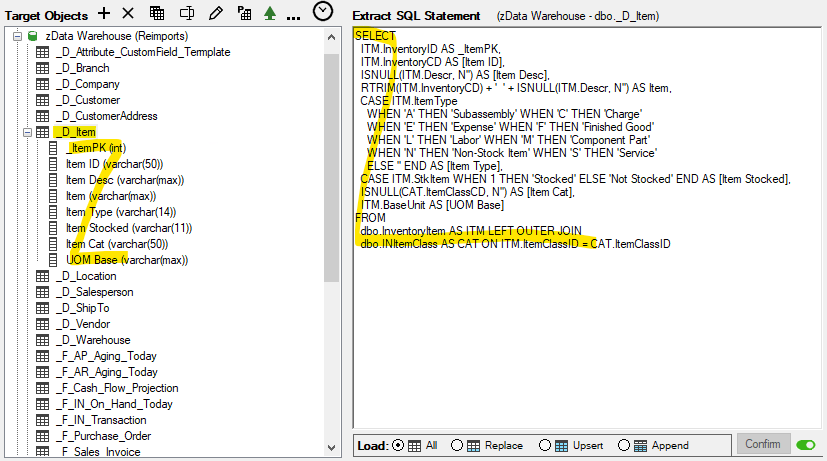
Example from ETL+ transformation: mapping ERP tables to the target _D_Item DFT+ table.
Stage 3 - Analytics
Stage 3 Analytics turns Stage 2 data into fast, ready-to-use datasets. Depending on the use case, this stage is implemented in the data warehouse and/or in tools such as Power BI, Tableau, Excel, and AI tools (such as Claude and ChatGPT).
DFT+ Star Schemas
Key benefits of a well-designed Star Schema include simplicity, flexibility, high performance, and a single version of the truth. It organizes data around a single fact table connected directly to its related dimension tables, making reports and data analysis easier to build, understand, maintain, and optimize for performance.
A star schema focuses on a single business process, such as Sales, Purchasing, Inventory, or General Ledger. Each dimension is directly related to the central fact table, creating a simple, intuitive structure that is ideal for most dashboards and reports.
Star schemas are easier to maintain, deliver excellent query performance, and provide a solid foundation for self-service analytics. As reporting requirements expand to span multiple business processes, multiple star schemas can be combined into a galaxy schema by sharing common dimensions.
Simplified Example
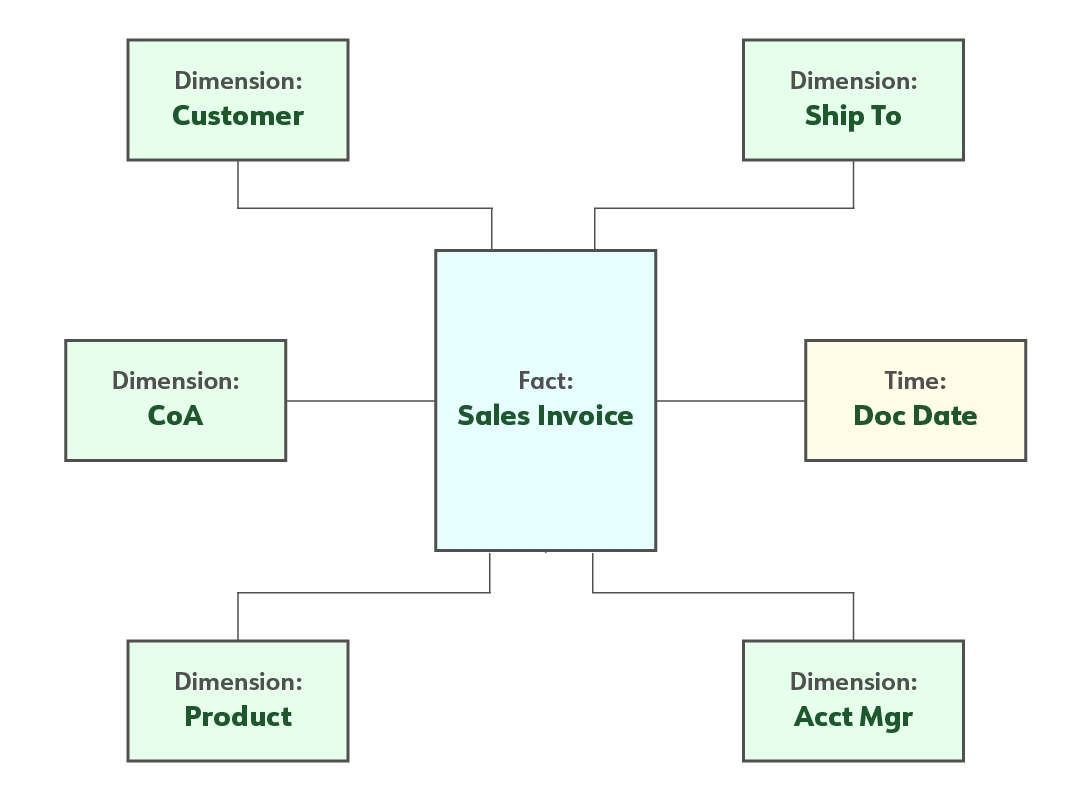
This example illustrates a single fact table surrounded by its related dimension tables, such as Customer, Product, Salesperson, Time, and Geography.
Example of a Production Star Schema
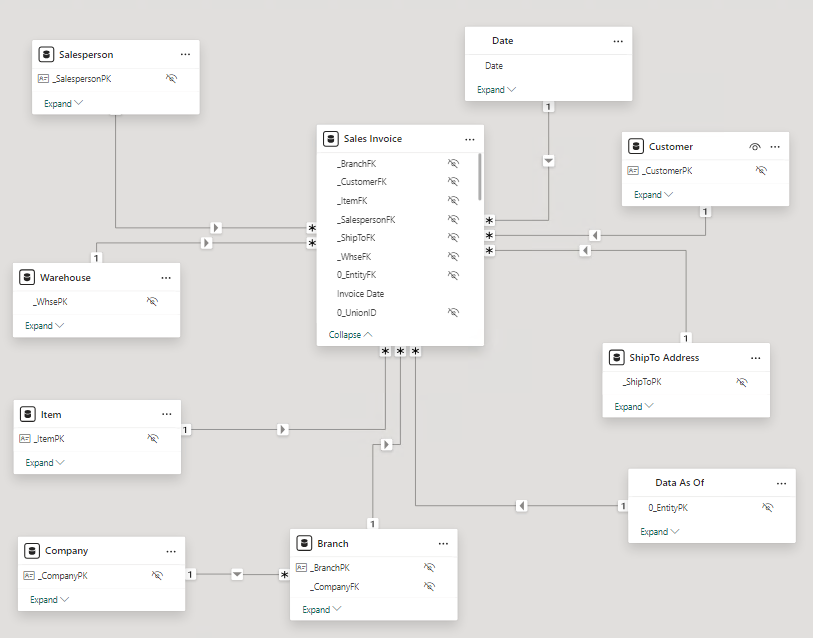
The following exemplifies how the Sales Invoice DFT+ tables are linked in DataSelf’s out-of-the-box templates in a star schema arrangement. This model works in reporting tools such as Power BI, Tableau, Excel, and AI tools such as Claude and ChatGPT.
DFT+ Galaxy Schemas
A key benefit of a galaxy schema is its ability to support reporting across multiple fact tables using shared dimensions within a single report. This enables users to analyze different business processes—such as sales, purchasing, inventory, and finance—from a consistent, unified perspective.
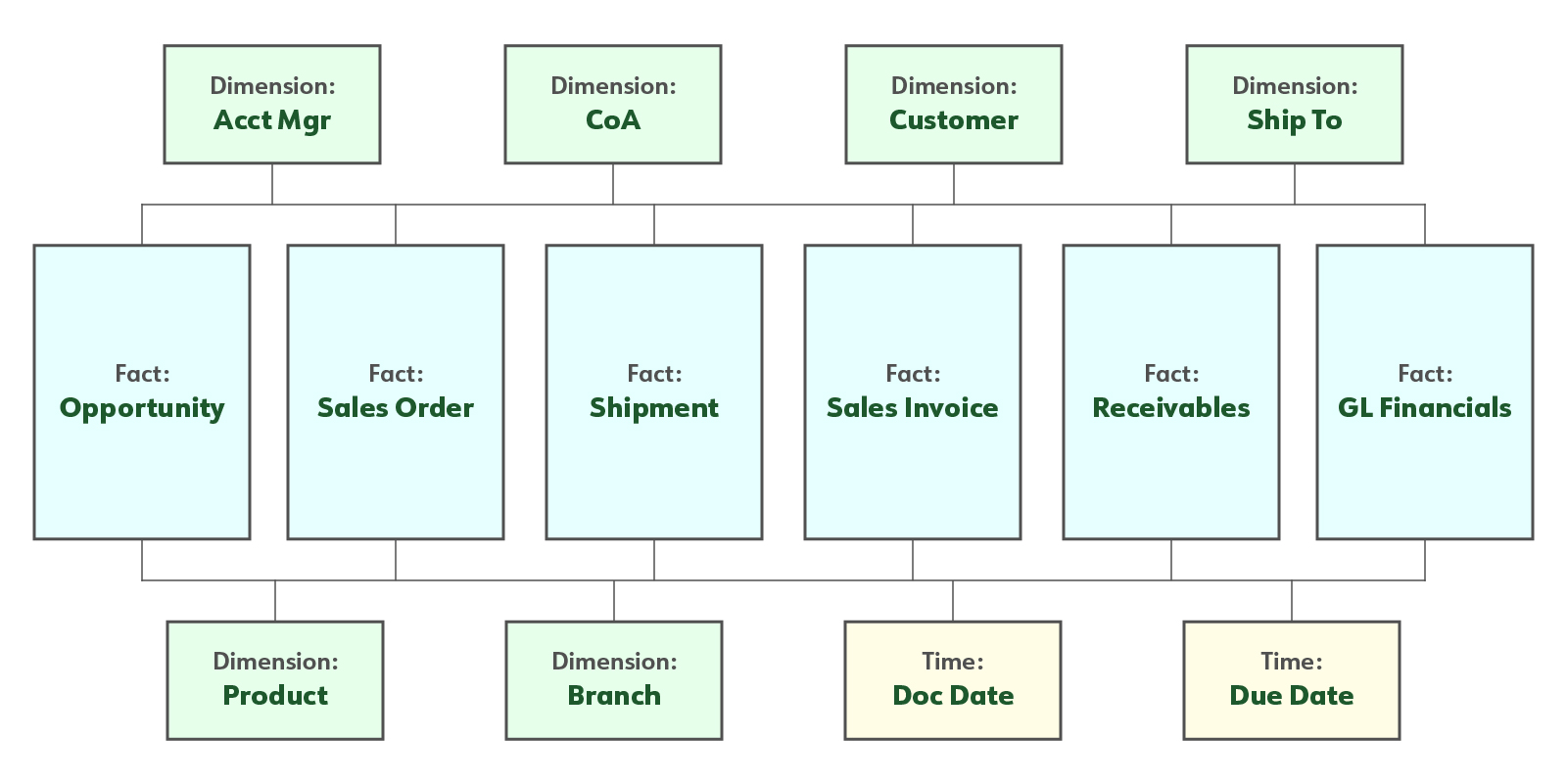
In a galaxy schema, not every shared dimension is necessarily related to every fact table. For example, the Chart of Accounts (CoA) dimension may be linked to financial fact tables but not to an Opportunity fact table, since opportunities typically do not have accounting entries.
This flexible design allows each fact table to include only the dimensions that are relevant while still providing a consistent analytical model across the data warehouse.
Simplified Example
This example illustrates six fact tables sharing six dimension tables and two time dimensions.
Example of a Production Galaxy Schema for Distribution Companies
The following exemplifies how DFT+ tables are linked in DataSelf’s out-of-the-box templates in a galaxy schema arrangement. This works in reporting tools such as Power BI, Tableau, Excel, and AI tools such as Claude and ChatGPT.
Stage 4 - Downstream (Report, Dashboard, and KPI Templates)
This is comprised of KPI+, our extensive and customizable library of report, dashboard, and KPI templates that plug-and-play to Stage 3.
Click the following links to learn more:
Key Words: single source of the truth, ETL templates, data warehouse templates, analytics templates, tds, tdsx, twb, twbx, pibx.