
DataSelf can help organizations extract virtually any digital data into their BI and AI platforms. It supports data extraction from on-premises, private-cloud, cloud, and API-based sources using REST APIs, OData, Python-based scripts and connectors, ODBC drivers, and other integration methods.
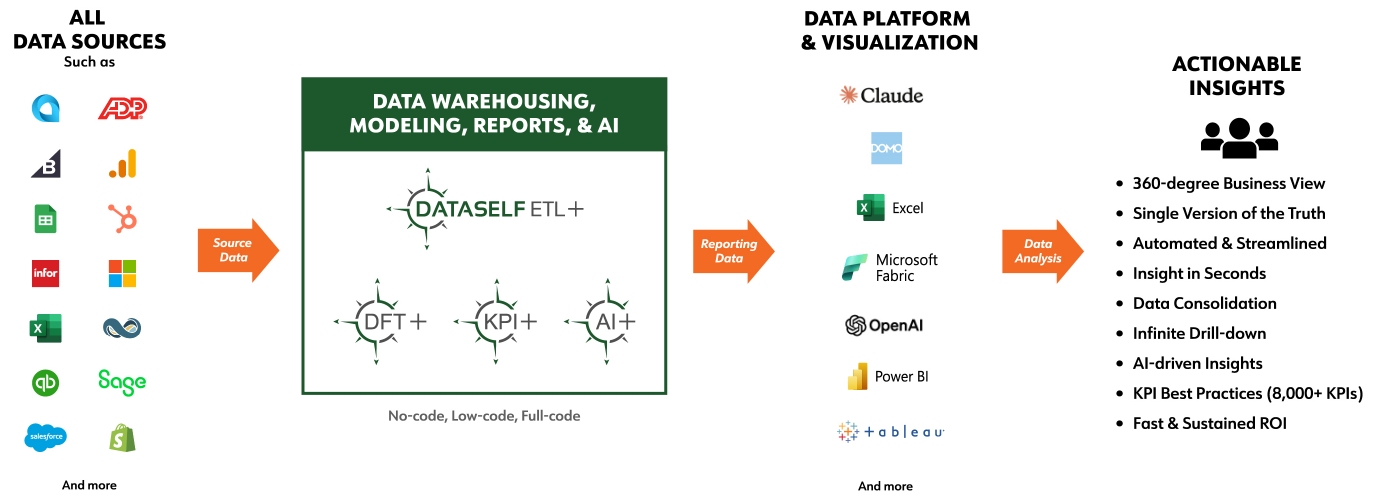
Below is a summary of data-extraction methods supported by DataSelf ETL+:
1. Automated ETL+ No-Code Extraction
ETL+ provides fully automated, no-code data extraction from a large library of data source types (click here for the list of ETL+ no-code sources). This approach typically requires no programming to set up or maintain. ETL+ automatically pulls the data into your data warehouse and refreshes your analytics platforms (Power BI, Tableau, Excel, and others) on a scheduled basis or on demand.
2. Semi-Automated ETL+ Extraction (No-Code / Manual Pull)
Some data sources do not provide an API or automated extraction method but allow exports in formats such as Excel, JSON, or CSV. In these cases:
-
You manually download or export the data (e.g., weekly or monthly), and
-
ETL+ automates everything after the download, including ingestion, transformation, modeling, and refreshing downstream BI dashboards.
This is ideal when automation isn’t possible at the data-source level but efficiency is still needed in the BI pipeline.
3. Automated ETL+ API Integration (Coding Required)
For data sources that require custom API calls—often REST/GraphQL APIs that require C#, Python, or another language—users can develop or reuse their extraction scripts and run them from within ETL+ (scheduled or on demand). This method allows ETL+ to orchestrate and monitor even complex or custom-built data pipelines.
This connectivity is increasingly important as the API ecosystem continues to expand. Postman’s Public API Network alone lists 500,000+ public APIs.
With AI-assistance, a large number of low-code/full-code sources are no longer requiring code writing, in practical terms, becoming no-code.
4. ETL+ with Advanced or Unstructured Extraction Methods
Some data sources fall outside the categories above—for example:
-
Unstructured content like PDFs, emails, documents
-
Specialized systems lacking exports or APIs
-
AI-assisted extraction pipelines
These scenarios typically require custom logic or third-party extraction tools. ETL+ can incorporate those scripts or tools seamlessly, allowing them to run as part of an automated or on-demand ETL+ job sequence.