
OData error message: Failure | Odata[0100] - The contents of table <table-name> are not available for this user. The remote server returned an error: (500) Internal Server Error.
Related error: OData: Message OData[0100] "contents ... not available"
-
Error may occur intermittently.
-
Often due to a time-out condition on the OData server. The time-out condition is influenced by settings documented at ETL+ Design Page and ETL+ Source Driver for OData.
Example Error Message
LiveODatav4.INLotSerialStatus - Failure
Odata[0100] - The contents of table INLotSerialStatus are not available for this user.
The remote server returned an error: (500) Internal Server Error.
Causes
May be due to a time-out condition on the OData server.
Solutions
1) Key+ key (ETL+ Design page).
Assign a Key+ to the table on the ETL+ Design page.
The presence of a Key+ key for the table in ETL+ seems to help OData “paginate” the query into smaller chunks of data.
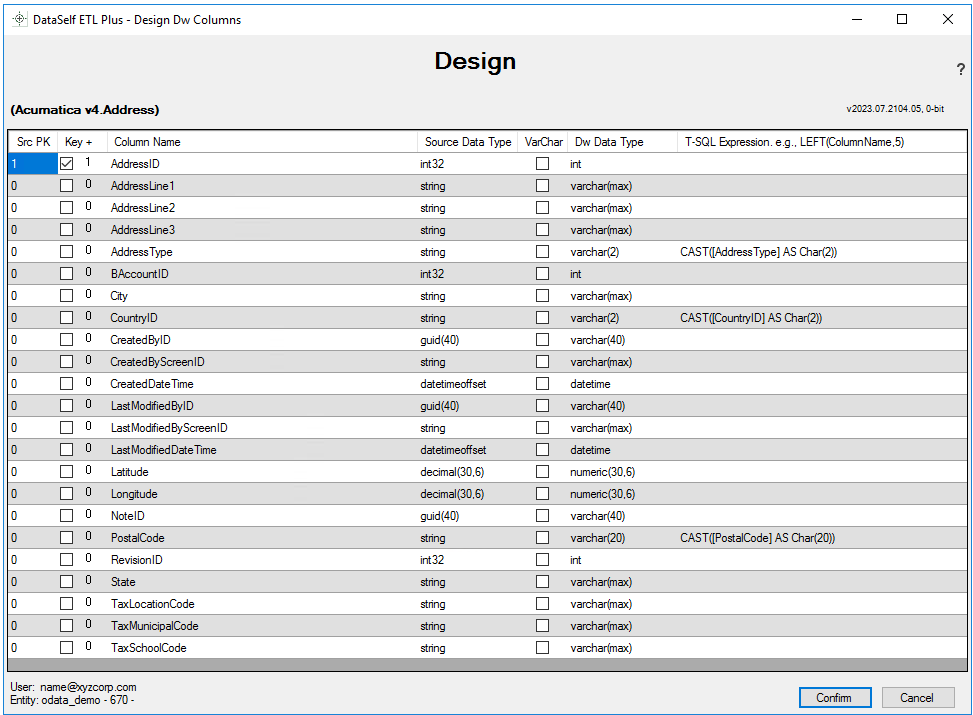
AddressID column is designated as the Key+ key.
2) Extraction pages and Pause settings.
Adjust the Extraction pages and Pause settings on the ETL+ Source Driver for OData page.
Related Pages
-
ETL+ Source Driver for OData – see the Extraction pages and Pause settings.