
The AI Assistant is a primary way to work in DataSelf Now. Describe what you want in a prompt, and the Assistant can help create or change reports, work with source tables, and model data for reporting. You can use prompts for both business questions and configuration tasks, subject to your role and the actions enabled in your environment.
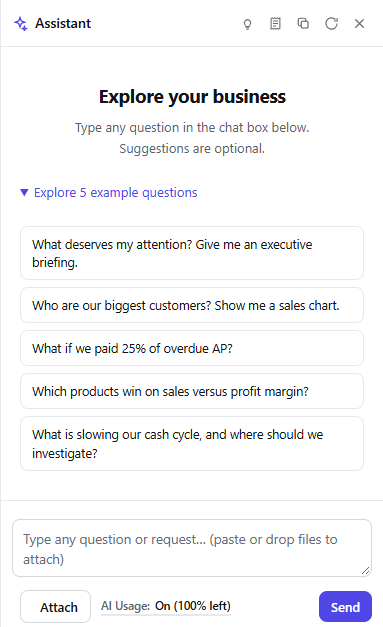
Start with a report
Open a report or dashboard and use the AI panel on the right. Ask a question, describe a change, or attach an image to provide context. For example:
-
“Show monthly sales by customer for this year.”
-
“Add a chart comparing actual sales with last year.”
-
“Change this dashboard to focus on overdue receivables.”
The Assistant can use the current report as context. Review the resulting report, including its filters, measures, labels, and layout, before sharing it with others.
Work with data and models
You can also prompt the Assistant to help prepare the data behind your reports. For example:
-
“Add the Acumatica table that contains purchase orders.”
-
“Create a model for sales by customer and month.”
-
“Add a field for gross margin percentage.”
The Assistant uses the available source and model information to interpret your request. If a request is ambiguous, specify the source, fields, business rule, or desired result. Check the affected tables and views under Data Source → Tables & Views, and refresh the data when needed.
Use the AI panel
At the top of the panel, select Give me ideas to ask for prompt suggestions or Show AI actions available to see what the Assistant can do in your environment. You can also copy or reset the chat, or close the panel. Enter your request at the bottom; the panel also supports image attachments and shows an AI usage indicator.
Review changes
For consequential changes, describe the intended outcome clearly and inspect what the Assistant proposes or completes. Confirm that the source data, calculations, filters, and report results match your business definitions. Available actions depend on your permissions and your organization’s AI settings.