
DataSelf’s Data warehouse can automate multi-currency reporting across all data sources and reporting platforms, even for originally single-currency data.
Definitions
Base Currency (“Base”): the business currency used in the internal company reporting. May be called Functional currency, Local currency, Base currency, Ledger currency, Home currency, etc.
Transaction Currency (“Tran”): The currencies used in external transactions, such as Sales Orders, Purchase Orders, Invoices, etc. May be called Transaction currency, Document currency, Foreign currency, Source currency, etc.
Consolidation Currency (“HQ”): A multi-national group may need to take Base Currency reports and convert them all into the group’s head quarter’s currency. May be called Reporting currency, Group currency, Consolidation currency, Presentation currency (IFRS official term), Corporate currency, etc.
Exchange Rate Table: A Lookup table for currency conversion calculations by date, To and From currency codes, currency conversion method, and conversion rates. This table must be frequently updated, either manually or in an automated import.
Currency Conversion Methods: The various exchange rate methods used for different purposes, with daily spot rate, monthly average rate, and closing rate being some popular for SMB’s. Clients should consult with their financial advisor for which rate to use for which data type.
Reporting Style Examples
The first step of a multi-currency implementation is to determine the desired reporting style(s) to be supported. Some examples of popular styles are shown below.
(For simplicity, only Sales variations are shown here. But all currency-based measures can be converted, including Cost of Sales, Margin, Commissions, etc. )
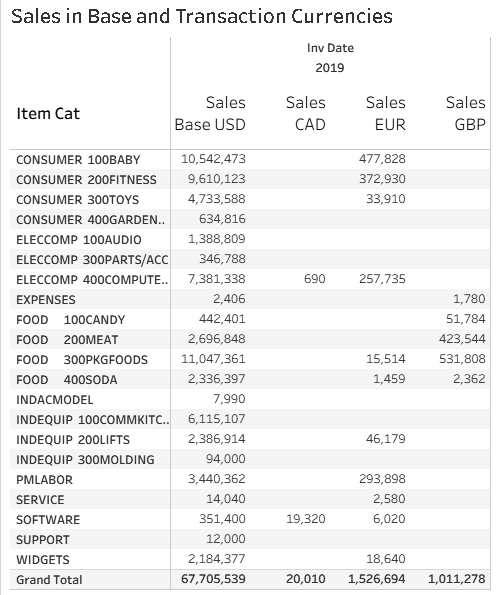
A few currencies, with named measures
If there are 5 or fewer currencies then creating separately-labeled measures for each currency (Base currency plus one for each for Transaction currency) makes for easy reporting without undue cluttering of the data model. See the first example below.
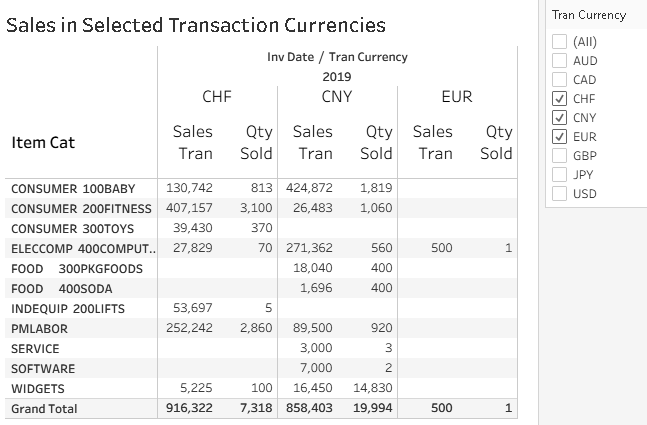
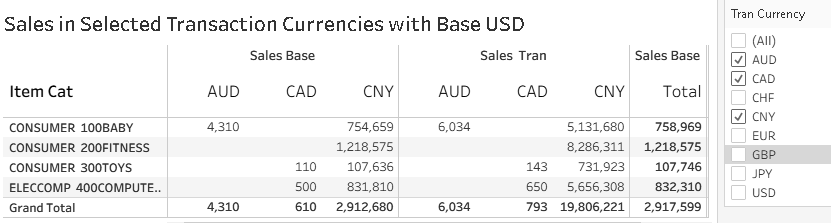
Optionally, the separately-labeled measures can be combined with a universal “Tran” measure and a Tran Currency filter (per the second set of examples) to also provide easy report replication for different currency sets by replicating the report and changing the filter selection, or implementing Row Level Security so that the filter selection(s) are automatically filtered according to each user’s security rights.
Example of a few specifically-named Transaction Currency measures
Many Currencies
Systems with a large number of currencies will find that a combination of one Transaction currency measure filtered and sliced by the multiple currencies produces a more efficient data model.
Row Level Security can easily limit user to only their allowed currencies while sharing universal reports.
Example of many Transaction Currencies, sliced and filtered by currency code
Types of Systems Supported
Self-contained ERP’s
-
Many ERP’s already have the multi-currency components built in with pre-calculated Base and Tran measures within the external transactions (and sometimes a consolidation option for General Ledger).
-
These ERP’s feature an exchange rate table with multiple conversion modalities available. The rates are either manually maintained or have an auto exchange rate import feature.
-
For these ERP’s, plugging the internal data into the selected DataSelf Reporting Style is straightforward.
Single-currency companies and/or multiple ERP’s combined into one multi-currency reporting entity
DataSelf’s ETL+ and data warehouse can transform a group of single-company ERP sources into one consolidated unit while maintaining detailed drilldown into each original company. The individual sources do not have to be from the same ERP, since DataSelf can convert the data into the other company’s format and union the sources together.
When the currencies have not already been calculated by the ERP, ETL+'s Transformation process will provide the conversions.
Usually one of the ERP sources does have an Exchange Rate Table that can be easily maintained by the client that ETL+ can use for the conversion calculations. Or DataSelf can automate and provide basic exchange rate needs with daily API downloads from one of several free sources.
Non-ERP sources
Any source that has currency measures with an associated date period can have those measures converted into other currencies. See the Single-currency companies section, above.