
Use Scheduled email reports to send dashboards and tables to recipients on a recurring schedule. Reports and dashboards can be attached as PDFs; and tables can be delivered in an Excel workbook.
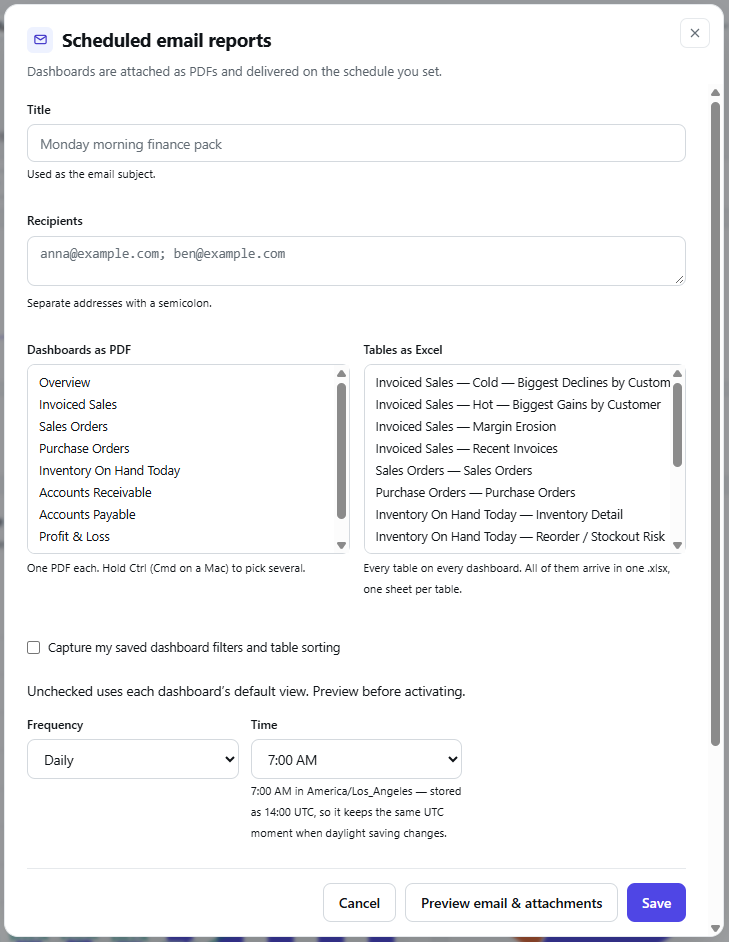
Create a schedule
-
Enter a Title. This becomes the email subject.
-
Enter the Recipients’ email addresses, separated by semicolons.
-
Select the Dashboards as PDF to include. Each selected dashboard becomes a separate PDF. Hold Ctrl (or Cmd on a Mac) to select multiple dashboards.
-
Select any Tables as Excel to include. The tables arrive in one
.xlsxfile, with one sheet per table. -
Choose the Frequency and Time.
-
Select Preview email & attachments to check the result, then Save.
Dashboard filters and sorting
Select Capture my saved dashboard filters and table sorting to use your saved view in the attachments. If you leave it unchecked, each dashboard uses its default view. Preview the attachments before saving the schedule.
The time setting shows your local time zone and the UTC time used to store the schedule. Check this conversion if delivery at a particular local hour matters when daylight saving time changes.