
Information Required Before Restoring a Data Warehouse
When restoring a data warehouse from a SQL Server backup, it is helpful to gather the information below beforehand. This allows us to verify SQL Server version compatibility, estimate storage requirements, and prepare the target environment appropriately.
SQL Server Properties
In SQL Server Management Studio (SSMS):
-
Right-click the SQL Server instance.
-
Select Properties.
-
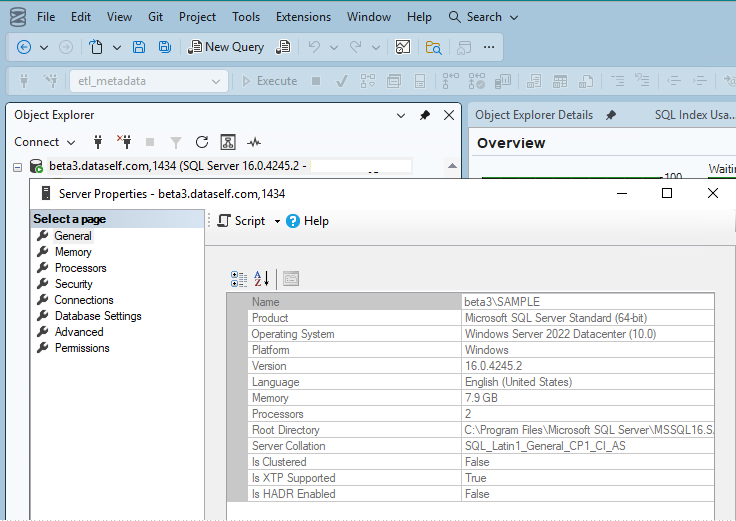
Please send a screenshot of the General page similar to the example below.
Example:
-
Right-click beta3.dataself.com → Properties
-
The Server Properties window will open.
Database File Information
In SSMS:
-
Right-click the data warehouse database.
-
Select Properties.
-
Select the Files page.
-
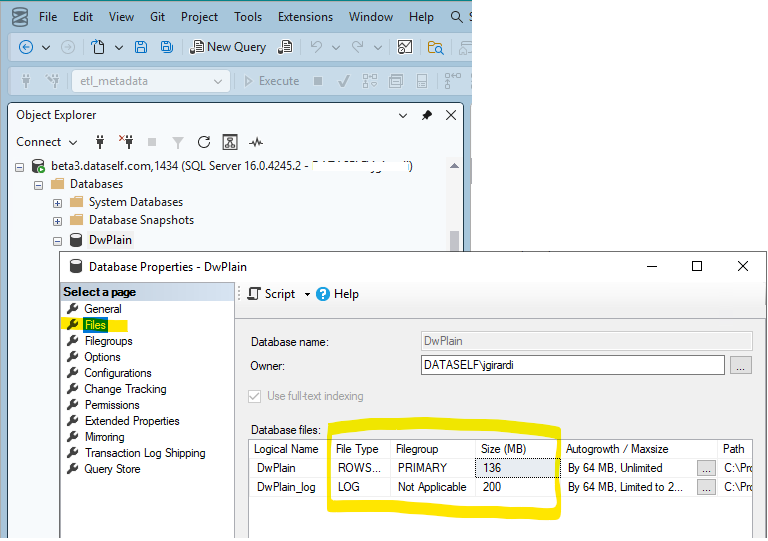
Capture a screenshot showing the database files. Please ensure the screenshot includes the following columns: Logical Name, File Type, Path, Size
Example:
-
Right-click DwPlain → Properties → Files.
If the Information Above Is Not Available
If the screenshots above were not provided or the information appears incomplete, you can retrieve key backup details directly from the backup file.
Run the following query in SSMS on a SQL Server that has access to the backup file:
RESTORE FILELISTONLY
FROM DISK = 'C:\Backups\YourBackup.bak';
This command returns information about the database files contained in the backup, including logical file names, file types, and sizes, which can be used to estimate storage requirements and prepare the restore process.