
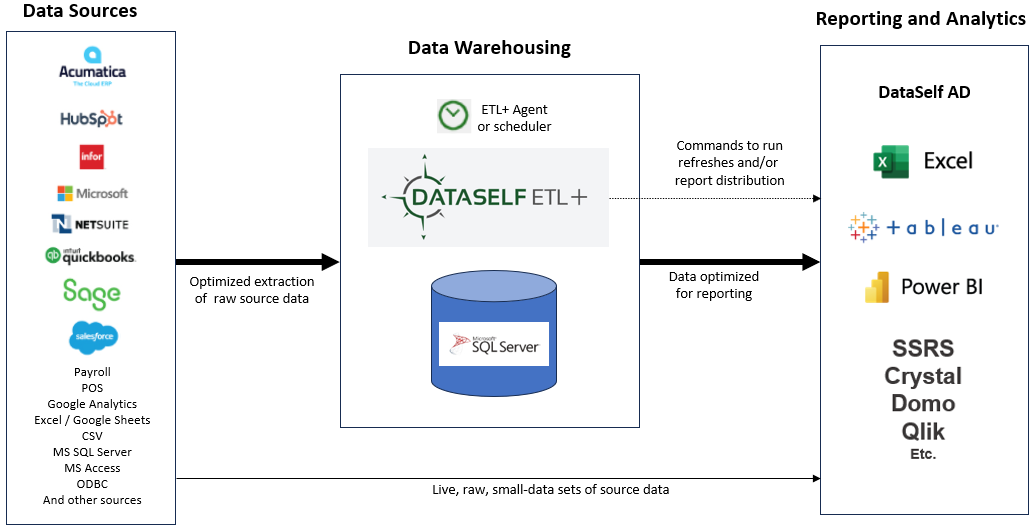
DataSelf Analytics Components
|
Object |
Object Details |
Location |
Function |
Permissions |
References |
|---|---|---|---|---|---|
Data Sources
|
The client’s data source(s) such as their ERP, CRM and payroll. Data held in SQL or other data repositories.
|
On Premises, or private cloud, or cloud (e.g.: Acumatica, NetSuite, Sage Intacct, Salesforce). |
DataSelf ETL+ can import from a hundreds of data sources using the built-in drivers below (and more coming!): |
Various |
|
ETL+
|
DataSelf's proprietary Extract, Transform, Load program. |
Potentially multiple installations, on prem and cloud, as a thin client |
Extract, Transform, Load data into Data Warehouse |
Named-user ETL+ license |
DataSelf ETL+ User Guide
|
ETL+ Agent
|
Runs as a thin-client service to run scheduled tasks and/or instructions from the cloud metadata |
Potentially multiple installations. Installed as needed with the ETL+ engine |
Triggers a local ETL+ Job per metadata instructions. Can also be run locally on demand via command line. |
|
|
Data Warehouse
|
A MS SQL data warehouse |
Can be in a DataSelf cloud SQL instance, or on-premises, private cloud, server or serverless. |
Back-end consolidation of data silos. Can be maintained by an ETL+ entity and other MS SQL compatible tools |
Named-user SQL user for SSMS access (optional); a user is maintained in the ETL+ metadata |
MS SQL instance URL and database name shown on ETL+ Extract, Transform and Load (ETL) Page |
Reporting
|
Tableau, PBI, Excel, Crystal, SSRS, Domo, Qlik Sense, etc |
Anywhere |
Front-end reporting to users |
Importing data from the SQL Data Warehouse requires a static IP internet connection and named-user reading rights to the SQL data warehouse. |
Connecting to a DataSelf SQL Cloud Data Warehouse
|
DataSelf ETL+
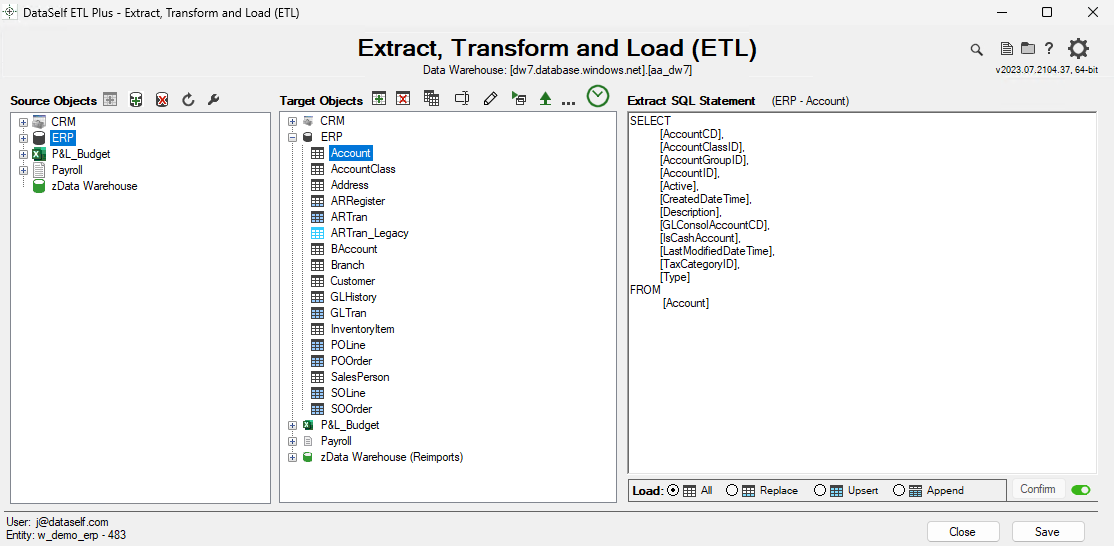
ETL+ Components
|
Object |
Description |
Function |
Permissions |
Client to Provide |
References |
|---|---|---|---|---|---|
Extract, Transform and Load (ETL) page
|
ETL+ main page upon login |
Displays and allows creation and editing of an entity’s (cloud) metadata from any ETL+ installation |
ETL+ licensed user
|
|
|
Settings page
|
Gear icon in upper right corner of most pages |
Client info, Data Warehouse options, and other parameter settings |
Administrator user required to create new entities, and manager user and Data Warehouse settings |
|
|
Data Sources
|
Listed on Source Objects
|
Provides connection configurations for importing from outside source systems (data sources or source types) and to reimport from the DataSelf Data Warehouse. |
Once entered by client, source data passwords are encrypted within the ETL+ metadata |
|
|
Extract SQL Statement
|
Right panel in main ETL+ page |
SQL statement (or other data format) to be sent to Source Container for the initial data extraction |
|
|
|
Load
|
Pane at the bottom of the right (Extract SQL Statement) panel |
Options for various partial load types |
|
Alert tech’s if a source table’s standard Primary Key has been customized |
|
Target Objects
|
Center panel of main ETL+ page |
Add and maintain the tables that will load into the Data Warehouse |
|
|
|
Design page
|
Design page
|
|
|
|
|
Jobs
|
Job page.
|
|
|
|
|
Entity
|
Usually associated to an entity of an organization. For instance, a company’s domain (xyzcorp), or a data source (xyzcorp_erp), or a department (xyzcorp_sales). |
It includes the ETL+ metadata such as the access to data sources, target data warehouse, which tables are extracted and more. |
ETL+ users have named user licenses to open and maintain one or more specific entities. |
|
ETL+ Entity
|