
The Jobs tab controls what data DataSelf Now loads and when it refreshes. Open Data Source and select Jobs to review refresh settings and scheduled jobs.
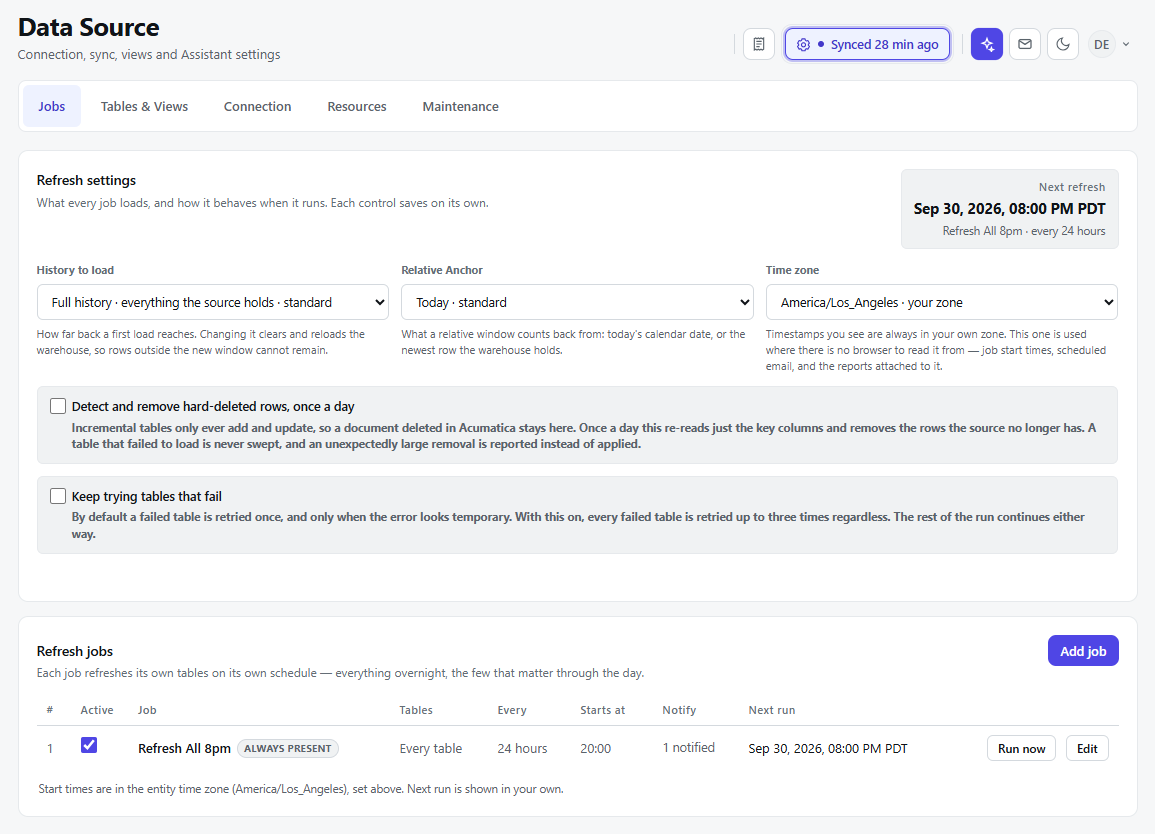
Refresh settings
Each setting saves when you change it.
|
Setting |
What it controls |
|---|---|
|
History to load |
How far back the initial data load reaches. Changing this setting clears and reloads the data warehouse; rows outside the new history window will no longer be retained. |
|
Relative Anchor |
The reference date for a relative history window: today’s date or the newest row in the data warehouse. |
|
Time zone |
The time zone used for scheduled job start times and timestamps when no browser time zone is available. |
|
Detect and remove hard-deleted rows, once a day |
Checks whether records previously loaded into incremental tables have been deleted from the source and removes them from DataSelf Now. A table that failed to load is skipped. An unexpectedly large removal is reported rather than applied. |
|
Keep trying tables that fail |
Retries each failed table up to three times. Without this option, a failed table is retried once only when the error appears temporary. Other tables continue loading either way. |
The Next refresh box shows when the next scheduled refresh will run.
Refresh jobs
Each job refreshes its assigned tables on its own schedule. The jobs list shows whether a job is active, which tables it loads, how often it runs, its start time, notification status, and its next run.
-
Select Add job to create another refresh schedule.
-
Select Run now to start a job immediately.
-
Select Edit to change an existing job.
-
Use the Active checkbox to enable or disable a job.
Job start times use the Data Source time zone. The Next run time is displayed in your own time zone.