
Children pages:
Overview
DataSelf MCP+ for Data Warehousing & Analytics provides AI tools and agents with secure access to curated, governed, high-performance data—optimized for efficient AI-token usage.
Model Context Protocol (MCP) is an open standard that enables AI assistants to connect securely and consistently to external data, tools, and business applications—much like USB standardized how devices connect to computers.
DataSelf MCP+ connects MCP-compatible AI assistants—including Claude, ChatGPT, Copilot, and Gemini—to your curated DataSelf data warehouse and analytics data structures. Users can query data, explore KPIs, generate reports, and analyze business information using natural language, without writing SQL.
Beyond standard MCP functionality, DataSelf MCP+ provides rich business metadata and DataSelf-specific query optimizations that help AI understand schemas, relationships, definitions, and reporting context. This delivers more trustworthy and governed results, faster query performance, and more efficient AI-token utilization by minimizing unnecessary data discovery and retrieval.
Prompt Examples
Prompt 1: “Show sales by year from the DataSelf DW”
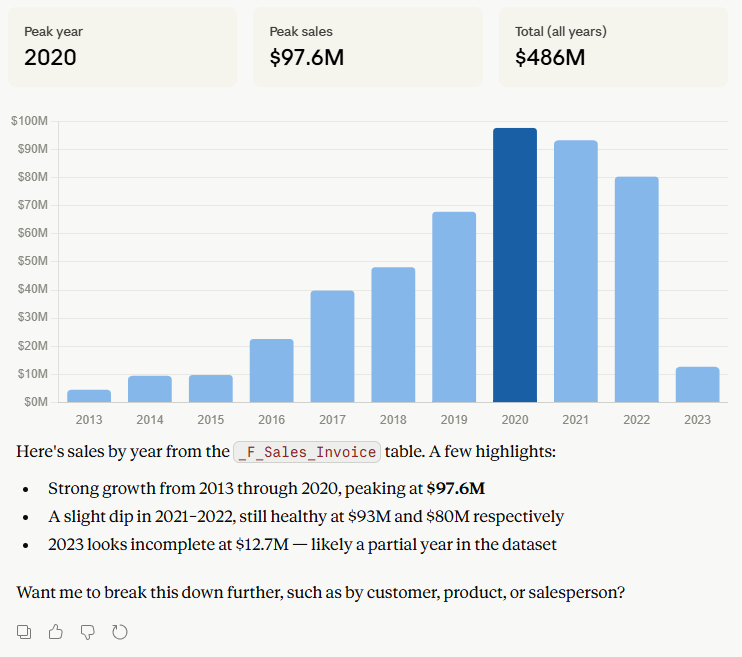
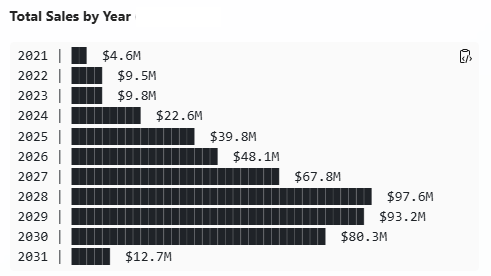
Prompt 2 (Click here to interact with the demo dashboard below):
“Create a dashboard with three coordinated visualizations from MCP+:
- Top-left chart: Sales by Year — Stacked Bar Chart. Display total sales by year, using one bar for each year. Segment each bar by Ship-To State and assign a consistent color to each state.
- Top-right chart: Sales by Ship-To State on a U.S. Map. Display total sales by Ship-To State on a U.S. map. Label each state with its state code and total sales. Use the same state colors assigned in the stacked bar chart.
- Bottom table/grid: Sales by Ship-To State by Year. Display Ship-To State on the rows and Year on the columns. Include totals for every row and column. Allow users to sort the table by clicking any column header.
Interactivity:
- Filter by state on the map: Clicking a state on the map filters the yearly bar chart to show only that state.
- Filter by year on the bar chart: Clicking a year’s bar filters the map to show sales for that year.
- Highlight active selections: Visually highlight the selected state or year on the visualizations.
- Filter by year dropdown: Add a multi-select year dropdown at the top of the dashboard.
- Download to Excel: Add a button to download the grid to Excel.”
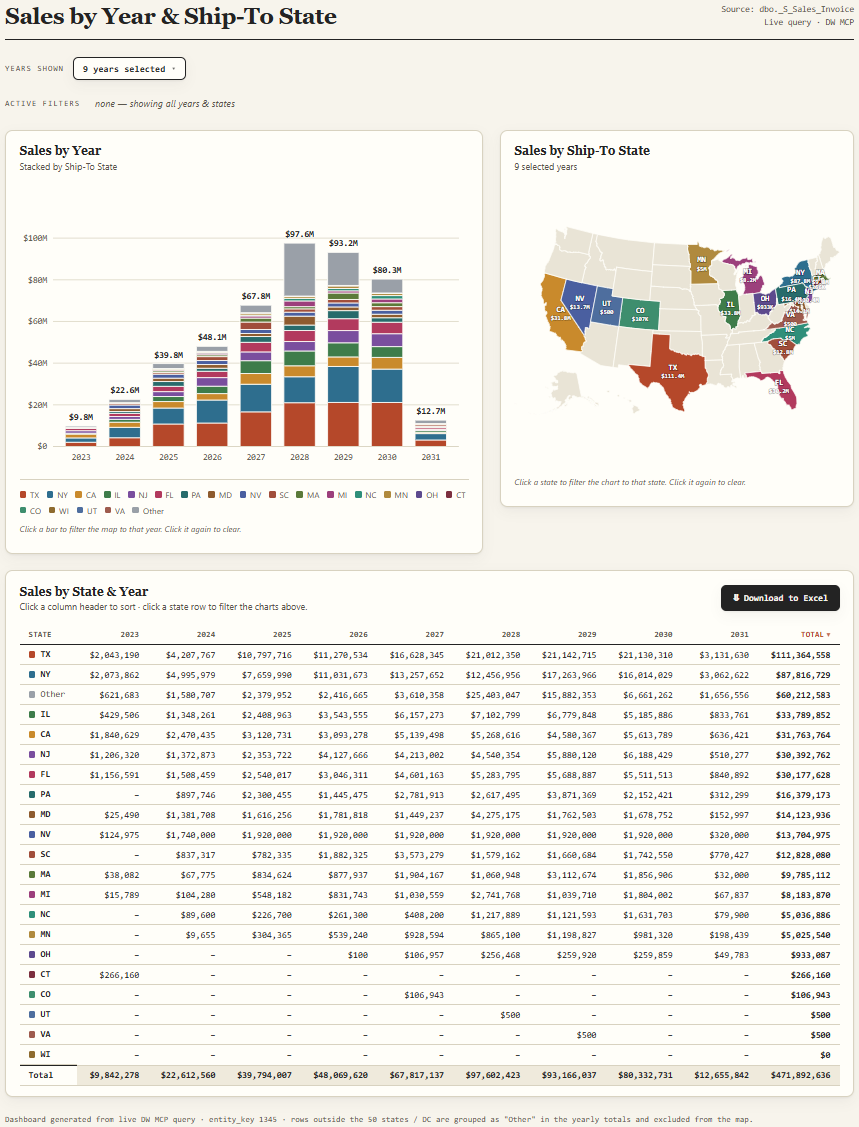
Note: asking the same prompt can render different results. Continue to prompt to adjust the results.
Why MCP Matters for Data Warehousing, BI & Analytics
Before MCP, connecting an AI assistant to a BI platform required bespoke engineering — custom APIs, fragile scripts, and one-off connectors. MCP replaces that complexity with a single standardized layer that:
-
Exposes data sources (SQL databases, Tableau workbooks, Power BI datasets) as AI-readable tools
-
Allows AI models to query live data rather than rely on stale training knowledge
-
Maintains security boundaries — the AI only accesses what the MCP server is authorized to expose
-
Works across platforms: Claude, Microsoft Copilot, and any MCP-compatible AI client
|
Strategic Note MCP adoption is accelerating across data warehousing, Microsoft, and Tableau ecosystems. Customers who build MCP-ready data architectures today will have a significant competitive advantage as AI-driven analytics becomes the new baseline expectation. |
|
Real-World Example A sales manager asks an AI assistant: "Why did our close rate drop in Q3?" . With the MCP connected to the data warehouse, Power BI, and/or Tableau, the AI can pull the relevant dashboards, cross-reference CRM pipeline data, and generate a grounded, data-backed answer — in seconds. |
|
User Goal |
Platform |
MCP in Action |
|
Forecast next quarter's demand |
SQL Server |
MCP chains AI + data warehouse queries |
|
Diagnose why a metric dropped |
Power BI |
MCP pulls context from ERP + CRM + BI |
|
Ask a question in plain English |
Tableau |
MCP queries live sales data instantly |
|
Generate an executive summary |
Any platform |
MCP assembles insights across data sources |
What This Means for our Customers
As a provider of data warehousing, Power BI, and Tableau solutions, we are positioned at the intersection of two powerful trends: the maturity of enterprise BI and the rise of AI-native analytics. MCP is the bridge between them.
Customers who adopt MCP-enabled workflows gain:
-
Faster time-to-insight — questions answered in natural language, not ticket queues
-
Reduced dependency on technical staff for ad-hoc data requests
-
AI that works with your existing data warehouse, Power BI, and Tableau investments — no rip-and-replace
-
A foundation for agentic workflows: AI that monitors KPIs, flags anomalies, and takes action
How MCP Works (Non-Technical Summary)
MCP operates on a simple client–server model with three components:
|
MCP Host |
The AI client — e.g., Claude, ChatGPT, Microsoft Copilot Studio, or any AI assistant that supports MCP. |
|
MCP Server |
A lightweight service that sits between the AI and your data platform (MS SQL Server, Power BI, Tableau, etc.) and exposes authorized capabilities. |
|
Data / Tools |
Your existing BI workbooks, dashboards, database queries, or business applications — unchanged. |
What Makes DataSelf AI+ Different
-
Connect supported AI assistants, including ChatGPT, Claude, Gemini, and Microsoft Copilot, to curated DataSelf data through MCP+.
-
Define and manage business rules in DataSelf with no-code, low-code, or full-code options.
-
Compare AI working directly with business sources against AI working with DataSelf’s governed data and models.
|
Capability |
AI without DataSelf |
AI with DataSelf |
|---|---|---|
|
Business Data Access |
Reads disconnected documents, databases, and APIs |
Unified, curated, governed data warehouse / data lake |
|
Business Logic |
Must infer business rules from prompts (potentially unreliable) |
|
|
Accuracy & Consistency |
Responses may vary between prompts |
Consistent, governed models, metrics and KPIs |
|
Results foundation |
Responses based on available context |
Responses grounded in deterministic business rules |
|
Business Context |
Requires users to explain their business and underlying data |
Built on ERP, CRM, accounting, and operational data models. |
|
Analytics Readiness |
Requires prompt engineering and validation |
Business-ready reports, KPIs, dashboards, and ad hoc analytics |
|
Hallucination Risk |
Higher |
Lower |
|
Performance |
Depends on source systems and prompt complexity |
Optimized analytical data warehouse for fast queries |
|
AI Token Usage |
Higher due to verbose prompts and schema discovery |
Lower through curated models and business-friendly metadata |
|
AI Portability |
Reports or analyses may remain tied to a particular AI workflow |
Reports saved in DataSelf can be maintained with different LLMs |
|
Your AI Context |
Can lack the context from your preferred LLM |
Leverages your LLM’s context to better understand your prompts |
|
Security |
Limited and time consuming |
Enterprise-grade framework |
|
Scalability |
Ad hoc and user dependent |
Standardized, reusable analytics across the organization |
LLM Families and MCP
The following Large Language Model families support MCP:
|
LLM Family |
MCP Ecosystem Support |
Notes |
|---|---|---|
|
Anthropic Claude models |
Native/original |
MCP was created by Anthropic |
|
OpenAI GPT models |
Supported |
ChatGPT + OpenAI tooling support |
|
Google Gemini models |
Supported |
Gemini clients/tools now support MCP |
|
Microsoft Copilot models |
Supported |
Through Copilot + VS Code ecosystem |
|
Meta Llama models |
Via MCP clients |
Common in self-hosted agents |
|
Mistral AI Mistral models |
Via MCP clients |
Often used in open-source stacks |
|
DeepSeek DeepSeek models |
Via MCP bridges/clients |
Popular for coding agents |
|
OpenRouter multi-model routing |
Broad MCP compatibility |
Used in many MCP setups |