
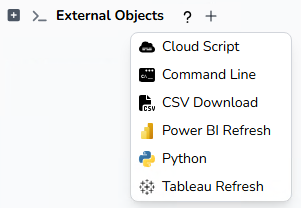
ETL+ External Objects allow users to integrate and orchestrate external tools, scripts, APIs, and automation processes directly within ETL+ workflows.
External Objects extend ETL+ beyond traditional ETL and ELT by enabling integrations with Python, command-line utilities, cloud scripts, Power BI, Tableau, APIs, MCPs, file operations, and custom automation tasks.
Use External Objects to:
-
Execute Python scripts and advanced data processing
-
Run command-line and operating system tasks
-
Trigger Power BI dataset refreshes
-
Refresh Tableau extracts and workflows
-
Connect to external APIs and cloud services
-
Automate operational and analytics processes
-
Extend ETL+ with custom business logic and integrations
ETL+ External Objects help organizations centralize data integration, automation, analytics orchestration, and AI-assisted workflows into a single governed platform.
Script Options
Cloud Script
This can be any sort of script to run in your DataSelf cloud environment. Contact DataSelf to discuss your goals and options.
Command Line
This runs command line scripts on your Windows machines running ETL+.
CSV Download
This is to download your data warehouse tables into CSV files on your Windows computer(s) running ETL+.
Power BI Refresh
This refreshes your Power BI semantic models manually or as part of your ETL jobs. You’ll need to configure ETL+ to work with your Power BI API Token for ETL+ .
Python
This runs your custom Python scripts in your DataSelf tenant manually or as part of your ETL jobs. This script is assisted by DataSelf AI+ and internal variables to more easily connect to your ETL+ sources and data warehouses.
Editing this script is only available via ETL+ Web.
Tableau Refresh
This refreshes your Tableau Cloud or Tableao Server data sources manually or as part of your ETL jobs. You’ll need to configure ETL+ to work with your Tableau API Token for ETL+.