
Use it to run Python scripts in your DataSelf Cloud entity.
-
Click + on External Objects → Python Script.
-
Fill out:
-
Scrypt Name
-
requirements.txt
-
Dependencies output
-
Script source code
-
Use built-in Environment variables below if/as needed:
-
DW_DB_Host
-
DW_DB_NAME
-
DW_DB_USERNAME
-
DW_DB_PASSWORD
-
DW_DB_PORT
-
See down below for how to use these variables.
-
-
Confirm -> Save
-
-
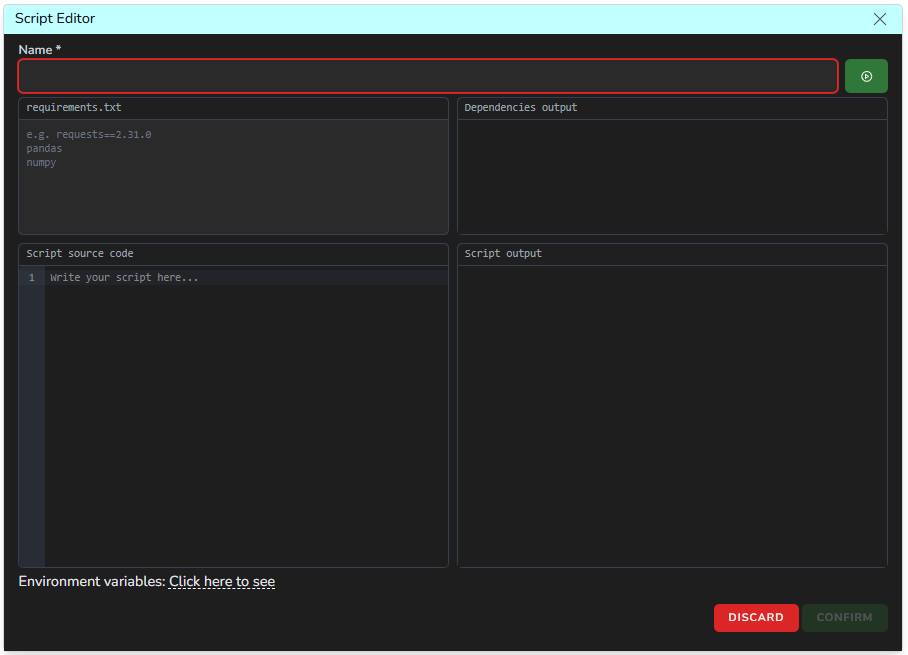
-
Then the Python script(s) will show on your ETL+ entity like the example below.

-
You can then run these objects manually by cliking their Run icon, and/or schedule to run them as part of your ETL+ Jobs.
-
You can also use the … icon for deleting them, and assigning Tags (if needed).
Using Environment Variables
The following is an example of Python settings so the script can write to its data warehouse:
Include in the Python requirements.txt box:
SQLAlchemy
pyodbc
Add the following section that sets the code to use the environment variables:
import os    # add this line at the top of the code, if not present yet

# --- SQL Server config -------------------------------------------------------
def _env(name: str) -> str:
    val = os.environ.get(name)
    if not val:
        sys.exit(f"Environment variable {name} is not set in this process")
    return val

DW_SCHEMA = "GA"   # Optional to customize the target SQL schema

BATCH_ROWS = 200_000   # rows per to_sql() call
SQL_CHUNKSIZE = 5000   # round-trip within one to_sql() call
MAX_RETRIES = 3
RETRY_DELAY_S = 5
Use the following to connect to the SQL dw before loading data:
# --- SQL Server (pyodbc / SQLAlchemy) ----------------------------------------
def get_engine():
   conn_str = (
        f"mssql+pyodbc://{_env("DW_DB_USERNAME")}:{quote_plus(_env("DW_DB_PASSWORD"))}@{_env("DW_DB_HOST")}/{_env("DW_DB_NAME")}"
        f"?driver=ODBC+Driver+17+for+SQL+Server&TrustServerCertificate=yes"
   )
   engine = create_engine(conn_str, pool_pre_ping=True, pool_recycle=280)

    @event.listens_for(engine, "before_cursor_execute")
    def _fast_executemany(conn, cursor, statement, params, context, executemany):
        if executemany:
            cursor.fast_executemany = True
    return engine