
Allows to run batch files on premise and private cloud VMs or computers. Here are some examples:
-
A dedicated MCP Server to connect your private systems to your AI tools and Agents.
-
Ongoing C#, Python, or JavaScripts to run other processes.
The device (VM/computer) to run this object must use an Windows OS.
With the current version, the device must be assigned your ETL+ Master Device.
-
Click + on External Objects → select Command Line.
-
To configure this object:
-
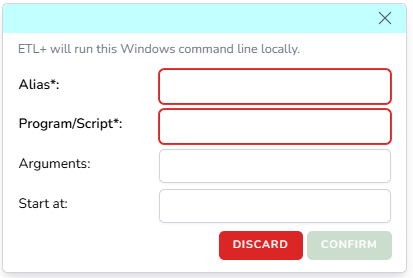
Alias: Enter an alias
-
Program/Script: Enter the path and batch file name.
-
Arguments: In many cases, this is optional to provide the batch file with parameters.
-
Start at: In many cases, this is optional to tell the OS where to run the batch file.
-
Click Confirm → Save.
-
-
Then the Cloud Script will show on your ETL+ entity like the example below.

-
You can then run these objects manually by cliking their Run icon, and/or schedule to run them as part of your ETL+ Jobs.
-
You can also use the … icon for deleting the script, and assigning Tags (if needed).
Windows Security
It’s important that the Windows service account running the DataSelf Windows Service has rights to execute the batch file functions correctly.